Ian Cairns@cairns
January 18, 2026
macOS really wants me to install some updates and reboot, so I'm going through all the "I need to look at these tabs" browser tabs before they are lost to me forever.
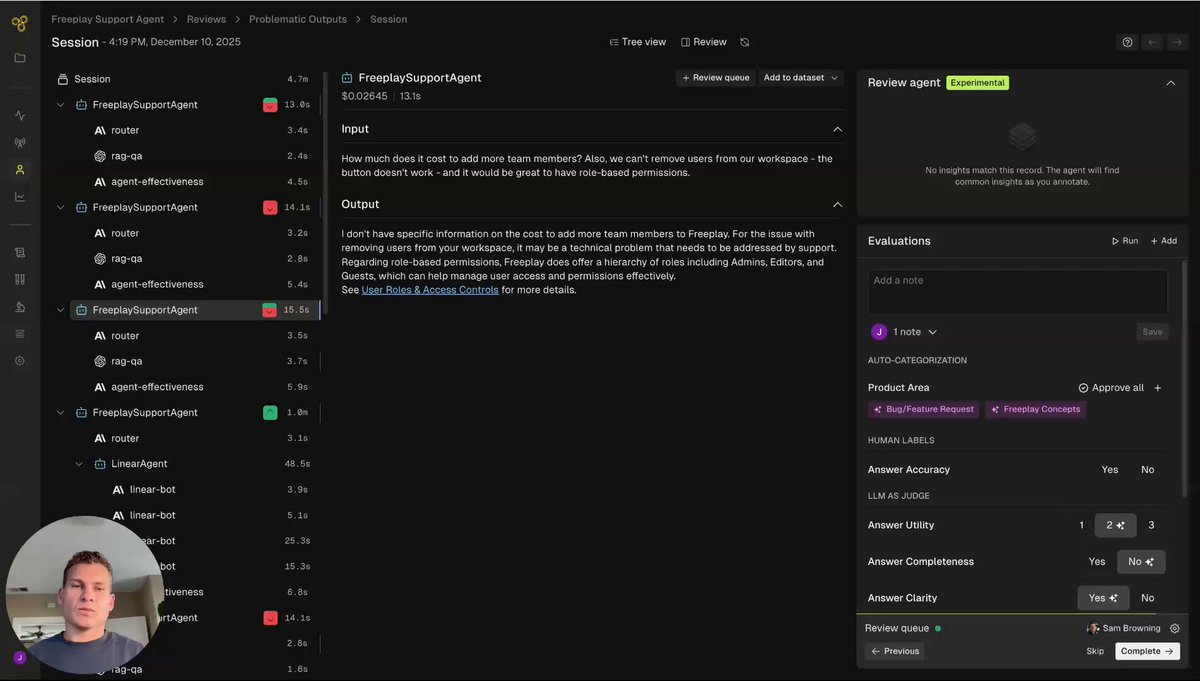
Last month @freeplay_ai launched a nifty new AI analytics feature that looks quite useful for voice agents. In the post below, @cairns describes this tooling as helping you identify patterns in production data.
For example, by surfacing similar examples that initial human review didn't catch, and suggesting next steps (building specific kinds of evals, creating new test data sets, automated optimization runs).
Here's my mental model of the product analysis loop that Review Insights helps you with:
human review of agent traces (categorization and labeling)
-> manual analysis
-> AI agent insights (Freeplay's tooling)
-> iterations/experiments
-> repeat
"How do you know if your voice agent is working" is a very large problem space. My high-level advice about evals and analytics is to break the problem space down into three phases of work:
Phase 1
As you're building, or early on after deploying to production, create a manual "evals" workflow. Use spreadsheets, or use the *simplest* features in Freeplay or any other devops tooling you use.
The *manual* part is very important. The goal here is to make sure that a human is LOOKING AT THE DATA to build intuitions about agent performance. Rule of thumb: create 10 test cases that you can run manually any time you change your prompts or anything else in your agent code.
Phase 2
Early on in your agent roll-out, look at as much production data as you can (call transcripts, recordings, LLM traces). Add new test cases to your manual test cases list.
Rule of thumb: increase your manual test case count from 10 to 100 examples.
This is one place where Freeplay's Review Insights feature could start to give you leverage, by helping you extend labeling and analysis work you are doing by hand.
Phase 3
Begin to automate analytics and testing. Here you are putting significant engineering effort into using tools like Review Insights, creating LLM-as-a-judge capabilities, and building off-line simulation testing.
The reason this phased approach works is that effective use of tooling requires, first, that someone on your product team has good intuitions about how well your agent performs in the "normal" modes of operation that you should understand well, and where some of the gaps and unknowns are when your agent talks to unpredictable, real-world users!
I'm excited about force multipliers like Freeplay's Review Insights approach, both as a way to help teams build good intuitive understanding more quickly, and then to iterate more quickly once that initial intuitions/data foundation is in place.
Ian Cairns@cairns🚀 New at @freeplay_ai: Review Insights
An agent that automatically clusters themes as you review data, then suggests actions like eval metric creation or automated prompt experiments.
Check it out.